
Identifying Static vs. Dynamic Content Elements
Last updated on October 28, 2025 at 10:36 AM
Understanding Content Types in Our CMS
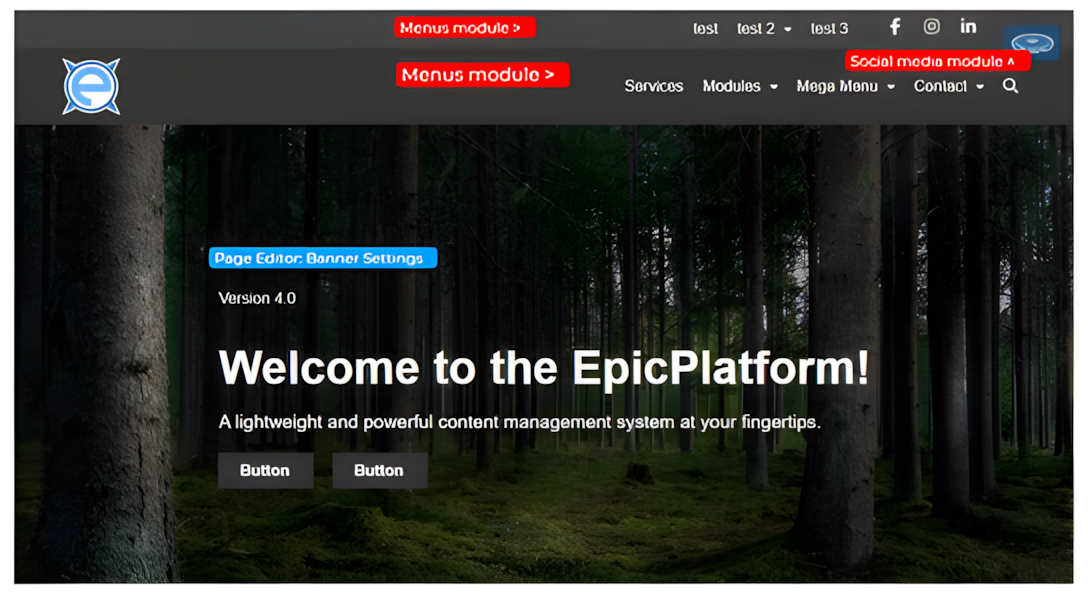
Dynamic Content Elements
Dynamic content represents interactive and flexible components of a website that can be updated globally and quickly. A prime example of dynamic content is navigation menus.
Characteristics of Dynamic Content
- Interactive and responsive to user actions
- Exist sitewide (present on multiple or all pages)
- Can be restructured and updated in real-time
- Managed through centralized modules like our Menus module
With our CMS, administrators can modify navigation menus across the entire site instantly. This means changes made in one location will automatically reflect everywhere the menu appears, saving significant time and ensuring site-wide consistency.
Static Content Elements
Static content refers to page-specific elements that remain consistent and are managed individually per page. These components are typically unique to specific pages and require more localized editing.
Examples of Static Content
- Page banners
- Body text/copy
- Page-specific images
- Unique section headers
Static content can be easily managed directly in the page editor, allowing for precise customization without affecting other pages or site sections.
